
What Is the Jahresbelegprüfung?
The Jahresbelegprüfung is a statutory obligation under the Austrian Registrierkassensicherheitsverordnung (RKSV). It serves to prove that your cash register is functioning correctly and that all cash transactions have been recorded properly.
Important: The audit must be carried out by 15 February of the following year at the latest. Missing this deadline can constitute a tax-related administrative offence.
How Does the Annual Receipt Audit Work in bessa POS?
In bessa POS, every Sales Point Closing is automatically signed with a Nullbeleg. The last sales point closing of the year automatically counts as the Jahresbeleg – there is therefore no need to create a separate "annual receipt".
Depending on whether you have activated the FinanzOnline integration, the procedure differs:
Variant 1: With FinanzOnline Integration (automatic audit)
If you have activated the FinanzOnline integration in bessa POS, the annual receipt audit is fully automatic.
How it works:
-
Carry out your first Sales Point Closing of the new year as usual
-
bessa POS automatically detects the year change
-
The audit of the last sales point closing of the previous year is automatically transmitted to FinanzOnline
-
After a successful audit, all sales point closings of the previous year are marked with a green checkmark ✓
Check the audit status:
Navigate to Reports > Sales Point Closings in bessa Manager. There you can see the audit status of all closings.
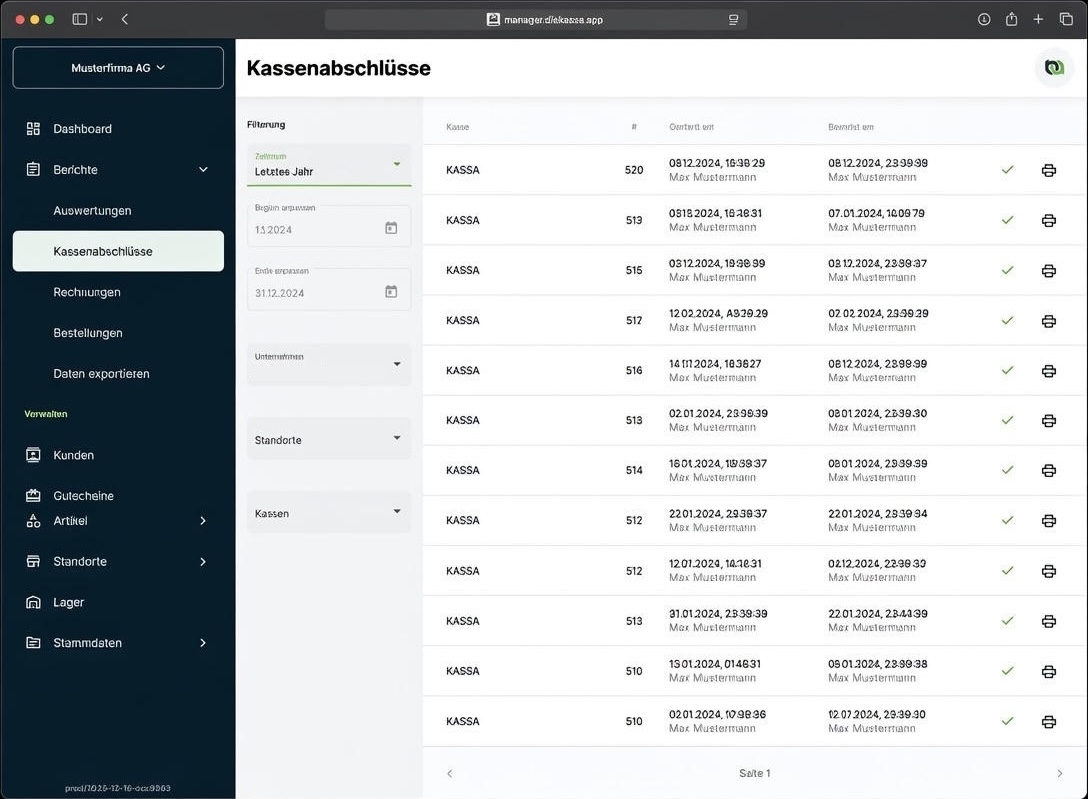
Note: You can activate the FinanzOnline integration under Master Data > Companies > [Company name] > Tax. FinanzOnline Integration – Create a Webservice User
Variant 2: Without FinanzOnline Integration (manual audit)
Without FinanzOnline integration, you must perform the annual receipt audit manually using the BMF Belegcheck app.
What you need:
-
Smartphone or tablet (iOS or Android)
-
The BMF Belegcheck app (free in the App Store / Google Play Store)
-
Access to FinanzOnline
-
The QR code from the last Sales Point Closing of the year
Step-by-step:
Step 1: Request an authentication code
-
Log in to FinanzOnline with your credentials
-
Navigate to Eingaben > Registrierkassen
-
Click "Verwaltung von Authentifizierungscodes für App zur Prüfung der Kassenbelege"
-
Click "Code anfordern"
-
Note down the 12-character code
Tip: If you already requested a code for the Startbeleg, you can reuse it. Existing codes can be found in the "Liste aller aktiven Authentifizierungscodes".
Step 2: Install the BMF Belegcheck app
Download the app:
-
Android:
Google Play Store
-
iOS:
Apple App Store
Step 3: Open the Jahresbeleg in bessa POS
-
Open bessa Manager
-
Navigate to Reports > Sales Point Closings
-
Open the last sales point closing of the previous year (e.g. from 31 December)
-
The QR code for the audit is on this receipt
Step 4: Scan the QR code and audit
-
Open the BMF Belegcheck app
-
Tap "Code scannen"
-
Scan the QR code from the sales point closing
-
Enter the 12-character authentication code
-
The app shows the audit result: Green checkmark ✓ = audit successful, Red X = error (see "Troubleshooting")
Step 5: Retain the receipt
Print the audited Jahresbeleg and retain it for 7 years.
Note: With a manual audit, the status is not visible in the bessa system, as no communication with FinanzOnline takes place. The successful audit is documented directly in your FinanzOnline account.
Troubleshooting
The audit shows an error (red X)
|
Error message |
Possible cause |
Solution |
|---|---|---|
|
"Signaturerstellungseinheit nicht registriert" |
The signature card is not correctly registered with FinanzOnline |
Verify the registration of your signature card in FinanzOnline |
|
"Kassenidentifikationsnummer nicht gefunden" |
The cash register is not correctly registered with FinanzOnline |
Check the cash-register registration in FinanzOnline |
|
"AES-256 Benutzerschlüssel falsch" |
The key was entered incorrectly during registration |
Correct the user key in FinanzOnline (see FinanzOnline > Registrierkassen > Liste aller Registrierkassen) |
|
"Allgemeiner Fehler" |
Temporary system error |
Try again later or scan the QR code from the screen instead of the printout |
The automatic audit was unsuccessful
Check the following points:
-
FinanzOnline credentials: Are the stored Webservice User credentials still valid?
-
Cash-register registration: Is your bessa POS registered as active with FinanzOnline?
-
Tax number: Does the tax number stored in bessa match the one in FinanzOnline?
If the issue persists, contact your tax advisor or bessa Support.
QR code cannot be scanned
-
Make sure the QR code is sharp and fully visible
-
Try scanning the QR code directly from the screen (instead of from the printout)
-
Clean the camera lens of your smartphone if necessary
Special Cases
Seasonal businesses
If your business is closed in December, the last Sales Point Closing before the seasonal break counts as the Jahresbeleg. It must also be audited by 15 February of the following year.
Opening hours past midnight (e.g. New Year's Eve)
If your business is open past midnight on 31 December, the Jahresbeleg can also be created after closing time or immediately before the first transaction of the new year (within one week).
Multiple cash registers
Each cash register requires its own Jahresbeleg audit. Repeat the procedure for every cash register set up in bessa.
Important Deadlines at a Glance
|
Event |
Deadline |
|---|---|
|
Create the Jahresbeleg |
At the latest on 31 December (or the last trading day) |
|
Audit the Jahresbeleg |
By 15 February of the following year at the latest |
|
Retain the receipt |
7 years |
Further Reading
-
BMF cash-register handbook
-
WKO: Auditing the cash-register annual receipt
-
FinanzOnline Integration – Create a Webservice User
Still Have Questions?
For questions about the Jahresbelegprüfung, contact:
-
Your tax advisor for legal and tax matters
-
bessa Support for technical questions about the point-of-sale system